I've been playing with puppet... well, it may actually go into production (lab production that is) so playing might not be that accurate. As usual I found myself fooling around the web and ran into this which I yet haven't listened to. Anyhow in the comments I saw someone talk about a book he wrote published on Apress. I followed the link, and as an impulse and because I never bought an ebook before, I decided to purchase it and check it out. The book in question is titled "Pulling Strings with Puppet: Configuration Management Made Easy".
I thought I didn't like to read ebooks, but somehow the feeling is quite different when the actual artifact was a purchased one. The value one inadvertently gives to such things astonishes me.
I'm also subscribed to the IEEE and rather read what is provided over digital media, but constantly look over what I get in print. I guess it is more related to the feeling and ease when skipping pages and going back and forth. I value that a lot, too bad it doesn't feel so good when you think about the trees at stake...
Monday, September 22, 2008


Friday, August 29, 2008
Having to learn Solaris on a platform different than Solaris
During the JRSL08 I attended a lecture sponsored by Sun. The lecturer handed out, together with an opensolaris CD, some brochures or sheets of paper as I like to call them with some info to access Sun's Academic Initiative (SAI), in other words, access to the courseware in order to learn Solaris to get certified or just learn (link).
I created my account a few days ago, added some courses to my learning plan and moved on to my usual work. Today I decided to try out a course in my plan only to see that accessing a random course brings Firefox down, after two other attempts and figuring out it wasn't some random thing I went on to the technical support section to find out that my patform wasn't supported.
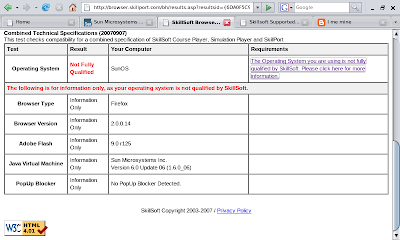
So my computer is reported as a SunOS, more precisely:
So these are the platforms that skillsoft supports:
That sucks big time, no Solaris and look at what it says about Apple and Linux... I'm going to try and update flash and then Firefox to three dot o and see if that does the trick....
I created my account a few days ago, added some courses to my learning plan and moved on to my usual work. Today I decided to try out a course in my plan only to see that accessing a random course brings Firefox down, after two other attempts and figuring out it wasn't some random thing I went on to the technical support section to find out that my patform wasn't supported.

So my computer is reported as a SunOS, more precisely:
$ uname -a
SunOS nargothrond 5.11 snv_93 i86pc i386 i86pc Solaris
So these are the platforms that skillsoft supports:
MicrosoftSkillSoft e-Learning solutions are supported on the following Microsoft Operating Systems.
- Microsoft Windows NT 4.0
- Microsoft Windows 2000
- Microsoft Windows XP
- Microsoft Windows Vista
Apple Macintosh OSX
SkillSoft has only tested using Mac OS X version 10.4. While you may be able to play SkillSoft content with later versions, to ensure full compatibility, SkillSoft recommends this version.
Linux
SkillSoft has only tested the KDE and GNOME desktops using SuSe Linux version 9.0, 9.1 and 10.0. While you may be able to play SkillSoft content with other versions, to ensure full compatibility, SkillSoft recommends one of these versions.
That sucks big time, no Solaris and look at what it says about Apple and Linux... I'm going to try and update flash and then Firefox to three dot o and see if that does the trick....
Friday, August 22, 2008
Jornadas Regionales de Software Libre

So here I am quite alone at the JRSL in Buenos Aires. I've met some interesting people. On the first day I probably listened to all of Dag Wieers' talks and looked for him in between to talk some more.
I also chit chatted with Christoph Hellwig and commented about Intel being in Cordoba, he sounded quite interested until I mentioned that we work on services there.
One of the greatest talks was on Thursday, by maddog, it was quite impressive, there was live streaming, so I guess there'll be a video out any time, anyone who couldn't see it should check it out.
I also go my picture taken with maddog :-)
Well I'm off to maddog's next talk...
Tuesday, July 29, 2008
opensolaris on the eee
After getting my 2[GB} RAM module I've decided to turn my eee which had xubuntu into an opensolaris carrier. I went with the snv_93 snapshot.
Problems found where the usual ones, keyboard did not work, plugging in a USB keyboard and unplugging it made the integrated keyboard work. To avoid this I read somewhere that making Solaris boot in debug mode (verbose '-v'), made the issue go away. So now I have some detailed boot up messages and a working keyboard. I wonder how much overhead that could cause.
Sound's working thanks to OSS, wireless works thanks to this driver.
I haven't tried the camera, the wired network isn't working, suspend failed and I can't install any big package onto the system (due to limited space).
What I'd like to get working are the special keys, I'll have to investigate and see if someone's done it already or move on and see if I can work on it myself. Getting the webcam to work isn't a priority of mine since I used it for skyping and since skype is not available for solaris yet, I don't have any motivation to walk that walk. I still need to configure the touchpad to get scrolling on the go.
Leaving that aside, all in all, I'm quite happy. So now I need space on my eee which only has 4[GiB], what else to do in the rush:
$ for i in `zfs list -t snapshot | grep -v NAME|awk '{print $1 }'`; do pfexec zfs destroy "${i}"; done
$ df -h|head -3
Filesystem Size Used Avail Use% Mounted on
rpool/ROOT/opensolaris
2.8G 2.4G 372M 87% /
I'm still short on space failing to install things. I'll see if I can get around this somehow, some other day...
Problems found where the usual ones, keyboard did not work, plugging in a USB keyboard and unplugging it made the integrated keyboard work. To avoid this I read somewhere that making Solaris boot in debug mode (verbose '-v'), made the issue go away. So now I have some detailed boot up messages and a working keyboard. I wonder how much overhead that could cause.
Sound's working thanks to OSS, wireless works thanks to this driver.
I haven't tried the camera, the wired network isn't working, suspend failed and I can't install any big package onto the system (due to limited space).
What I'd like to get working are the special keys, I'll have to investigate and see if someone's done it already or move on and see if I can work on it myself. Getting the webcam to work isn't a priority of mine since I used it for skyping and since skype is not available for solaris yet, I don't have any motivation to walk that walk. I still need to configure the touchpad to get scrolling on the go.
Leaving that aside, all in all, I'm quite happy. So now I need space on my eee which only has 4[GiB], what else to do in the rush:
$ for i in `zfs list -t snapshot | grep -v NAME|awk '{print $1 }'`; do pfexec zfs destroy "${i}"; done
$ df -h|head -3
Filesystem Size Used Avail Use% Mounted on
rpool/ROOT/opensolaris
2.8G 2.4G 372M 87% /
I'm still short on space failing to install things. I'll see if I can get around this somehow, some other day...
Sunday, June 01, 2008
On the opensolaris bandwagon
So I just spent the last couple of hours getting Opensolaris 200805 on my PC. I previously had SXCE on, build 81 I think. The move was not as straightforward as I would've liked, then again, it can be blamed entirely on myself since I did not read the Release Notes.
On my first try, I got my USB pen thingy and used the tool provided to copy over what was on the live CD onto my pen drive. So the USB pen drive was my first input into trying to install. Well, I couldn't even get the live system to load, which was good because I forgot to export my zfs filesystem which was not on my Solaris partition in order in re import it cleanly on the new install.
So I just moved on to the livecd, popped up the gui-install app and was on my way, chose the current partitining got to 99% and it just stalled there. So I restarted...
... and on my last try (many omitted), I just deleted my Solaris partition, my primary Linux Swap partition and created a new Solaris 2 partition on top of both. I also destroyed the rpool zfs that was lying around and got it to install.
Right now I'm installing openoffice, sunstudioexpress and netbeans with ips. While waiting for it to finish I went on and was going to re setup my cbe environment as I had in SXCE to build some applications out of the spec files provided.
I was going to document that but found this http://blogs.sun.com/dhollister/entry/solaris_vs_audacity, so if it works, great, if not I'll document the differences.
While I waited I also created a sourceforge accout with the intent of contributing some spec files. I hope I can live up to my own expectations and do it.
On my first try, I got my USB pen thingy and used the tool provided to copy over what was on the live CD onto my pen drive. So the USB pen drive was my first input into trying to install. Well, I couldn't even get the live system to load, which was good because I forgot to export my zfs filesystem which was not on my Solaris partition in order in re import it cleanly on the new install.
So I just moved on to the livecd, popped up the gui-install app and was on my way, chose the current partitining got to 99% and it just stalled there. So I restarted...
... and on my last try (many omitted), I just deleted my Solaris partition, my primary Linux Swap partition and created a new Solaris 2 partition on top of both. I also destroyed the rpool zfs that was lying around and got it to install.
Right now I'm installing openoffice, sunstudioexpress and netbeans with ips. While waiting for it to finish I went on and was going to re setup my cbe environment as I had in SXCE to build some applications out of the spec files provided.
I was going to document that but found this http://blogs.sun.com/dhollister/entry/solaris_vs_audacity, so if it works, great, if not I'll document the differences.
While I waited I also created a sourceforge accout with the intent of contributing some spec files. I hope I can live up to my own expectations and do it.
Subscribe to:
Posts (Atom)